Trade Senior

Which of your prop accounts can pay out today?

Trade Senior checks every evaluation and funded account against its firm's rules: drawdown room, consistency, minimum days and payout eligibility. Then it tells you what to do first. It also keeps your journal, your costs and, if you want it, copies trades between your own accounts.

7 days free on every plan, cancel any time. Runs in any browser, including your phone.

Can this account pay out?

Pick a plan, then move the sliders to where your account is. The rules are the ones built into Trade Senior.

Check all my accounts like this

Risk disclosure. Trading futures involves substantial risk of loss and is not suitable for everyone. Trade Senior does not promise results or give financial advice. Read the full disclosure.

Trade once. Copy to your own accounts, carefully.

Place the trade on one leader account and Trade Senior mirrors it onto every follower you choose, each with its own size and risk limits. It is off until you start it, and it is built to fail safe.

One leader, every follower

Pick the account you trade on and tick the accounts that follow it. Order copying then holds the same position on every follower's real account. The activity log shows each order before and after it is sent.

  1. Dry run firstReads positions and logs what it would send, like the lines in the picture. Sends nothing.
  2. Starts only from flatIt won't start unless every follower account has no open position.
  3. The journal fills itselfEvery copied trade is written into the leader's and each follower's journal.
  4. Off after a reloadIt only runs while the page is open, and turns itself off when you reload.
Copy trading, in dry run. Sample data.

Risk management, account by account

Every follower gets its own size and its own limits, so a small account is never sized like a big one.

  1. Your own size for each accountSize is the leader's contracts times a multiplier: 0.5 is half, 2 is double. A max contracts number caps it.
  2. Daily loss limit and profit targetEnter them here, then set the same numbers in that account's TopstepX risk settings. TopstepX enforces them, so they hold even if your browser closes. Live copying won't start until you confirm each one.
  3. One account stops, the rest keep goingIf TopstepX closes or refuses an account, only that account pauses until 5:00 PM Central.
Risk settings for each follower. Sample data.

Order copying works with Topstep accounts. Trade Senior cannot set TopstepX risk limits for you, so you enter them there yourself. Orders go from your browser straight to your firm's platform, with no servers of ours in between. The trade-off: keep the page open while it runs. Check that your firm allows copying before you use it.

What does it look like when my accounts are in a trade?

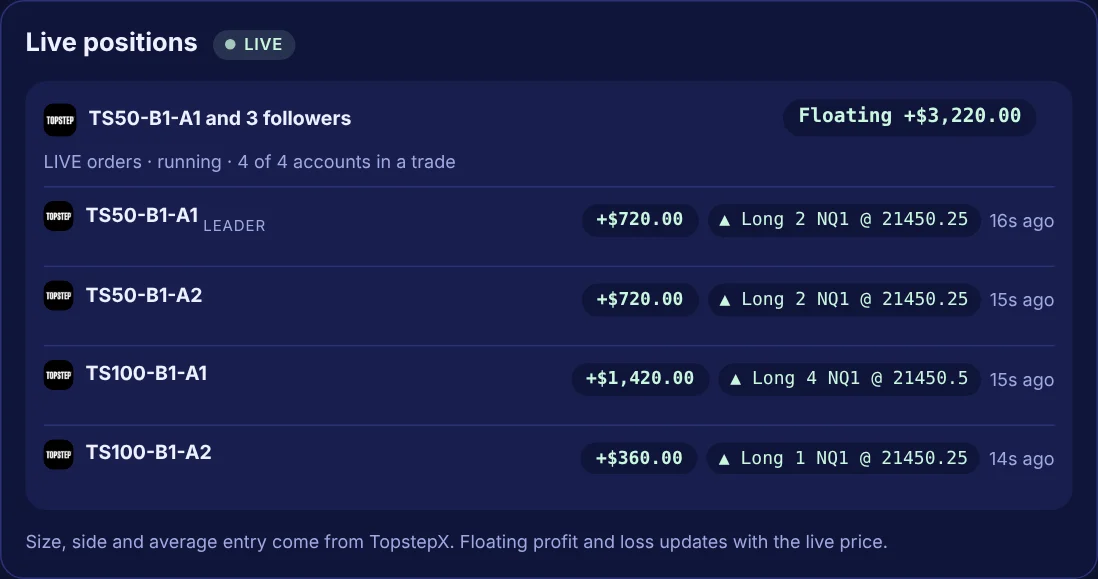
While order copying runs, the Today page shows every account in the group with its open trade: side, size, average entry and how long ago it got in. You see at a glance that the followers match the leader, each at the size you set for it.

  • The leader and every follower on one card, each with its firm logo
  • Side, size and average entry for each account, straight from TopstepX
  • Floating profit and loss for each account and for the whole group
  • How many of your accounts are in a trade right now
  • A clear Live or Dry run label, so you always know if real orders are being sent
The Live positions card on the Today page: a leader and three followers, all long E-mini Nasdaq (NQ) with their sizes, average entry prices, floating profit for each account and the group total.
Live positions. Sample data. Order copying works with TopstepX accounts. Floating profit is coming soon.

Can I show my day without sharing my accounts?

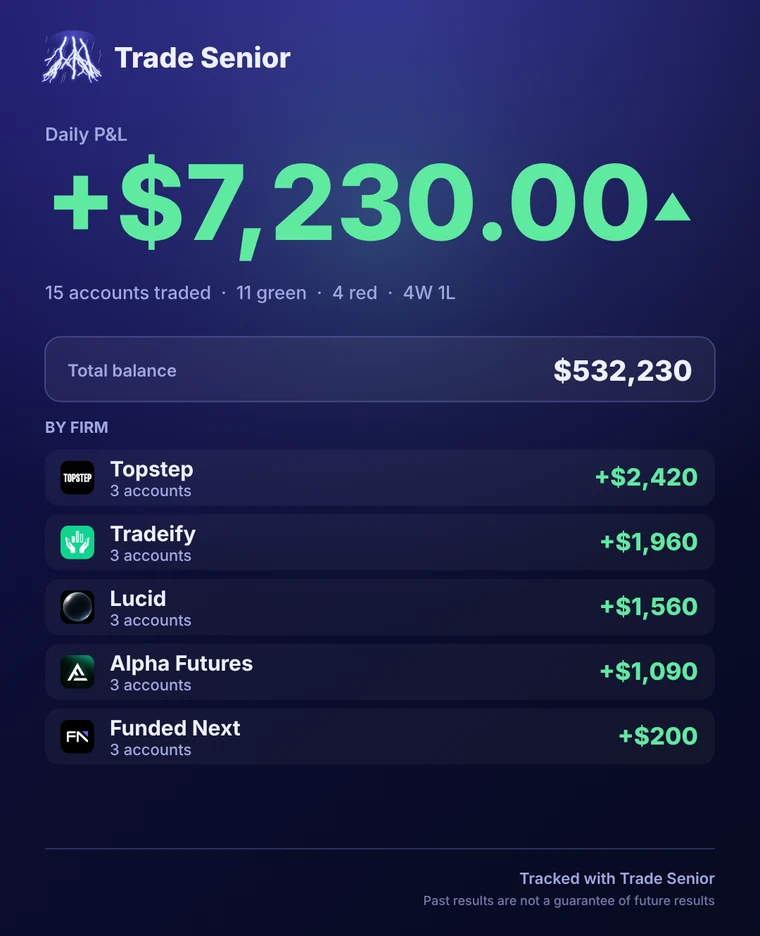
One tap turns today's results into a clean picture you can post or send. It shows your daily profit and loss, how many accounts finished green, and each firm with its logo. Nothing leaves your device until you choose to share it.

  • Daily profit and loss in big numbers, green or red
  • Switch between a summary by firm and a list by account
  • Hide your total balance with one tick when you only want to show the day
  • Add your own name or handle at the bottom
  • Copy the image, download it, or send it from your phone's share menu
A Trade Senior share card: daily profit and loss of plus $7,230, 15 accounts traded, total balance, and a result for each of five firms with their logos.
Share today's P&L. Sample data. It uses the trades you logged today.
Results. Sample data.

Are my accounts paying off?

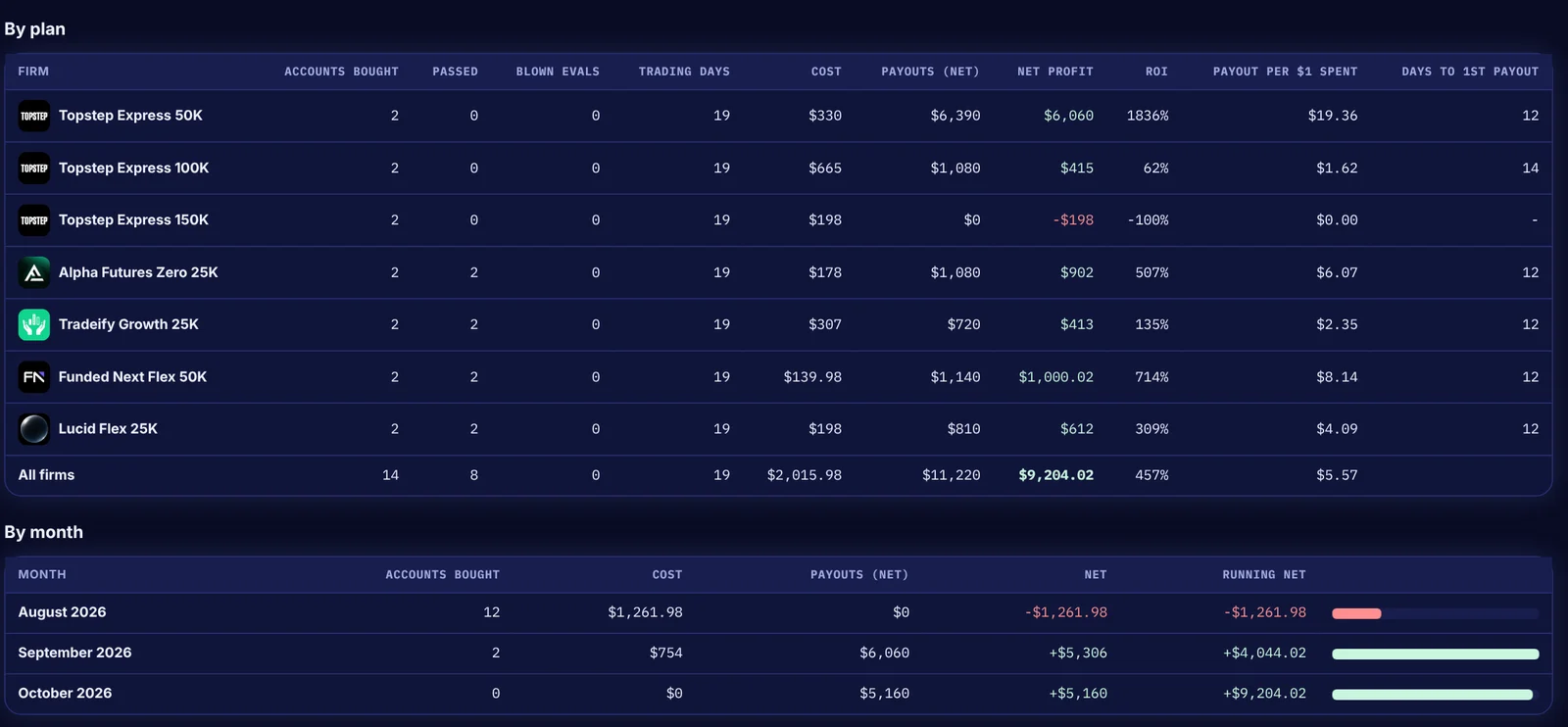
Every account you buy is an expense, and every payout is income. Results puts them side by side so you can see what your prop firm business really earns, for any period from this week to lifetime, or for one plan at a time.

  • Net profit: payouts after each firm's split, minus what the accounts cost
  • Return on spend: your ROI, and how many dollars come back for every dollar spent
  • Account costs include monthly rebills, activation and reset fees you add in History
  • From bought, to passed, to paid out, with blown evals and days to first payout
  • Spent against paid out for every month
  • Filter everything by firm, account type or exact account
The full Results tables: one row per account type with accounts bought, passed, blown, trading days, cost, payouts, net profit, ROI, payout per dollar spent and days to first payout, and a month by month table with a running net.
The full tables: every account type and every month, with all columns. Sample data.

Which of my accounts can I act on right now?

Every batch of accounts gets a plan card with its balance, drawdown floor, cushion and the firm's payout checklist. When a payout is possible, it says so and gives you one button to record the request. Next best moves puts the most useful action first and says why.

  • Cushion above the floor, using the weakest account in the batch
  • Evaluations show progress to the target and the balance you need to pass
  • Today's results for all accounts, by plan, with best and worst trade
  • Log a day once, add a second or third trade if you took more, and it fills in for every account in the batch
  • With copy trading on, the journal can fill itself from TopstepX, and the log form tells you which accounts no longer need typing
  • Before you save, it shows what the day would do: which eval would pass, which account would become payout ready
Today. Sample data.

What does my trading actually look like?

Stats turns your logged days into an equity curve with your biggest drop marked, a win rate, expectancy and profit factor, average win against average loss, results by weekday and long against short. Pick any period from Today to Lifetime, or your own date range, and filter by firm.

The real app, filled with sample data. Nothing here is a real account or a real result.

What happened on the 9th?

History is a calendar tinted by how each day went. Click a day to see the breakdown by firm and write down what you did. Each day holds one rating, up to six screenshots and a note, so a bad Tuesday is easy to find again.

  • Switch between funded only and funded plus eval days
  • Month profit, green days and red days at a glance
  • Press By firm to see the calendar for one firm at a time, with each firm's result next to its logo
  • Download a backup of every record at any time
History. Sample data.

What does each firm actually require?

Rules for Topstep, Alpha Futures, Tradeify, Funded Next, Lucid, MyFundedFutures, Take Profit Trader, Apex Trader Funding, E8 Markets, Top One Futures and BluSky are built in: profit target, drawdown type and size, daily loss limit, consistency rule, minimum days and payout terms for evaluation and funded accounts. Where a rule is unclear or two pages disagree, the app says so instead of guessing.

  • Plan finder picks plans from your budget and the rules you can live with
  • Compare plans puts any plans you choose side by side
  • Edit any rule yourself when your firm changes it
TopstepAlpha FuturesTradeifyFunded NextLucidMyFundedFuturesTake Profit TraderApex Trader FundingE8 MarketsTop One FuturesBluSky

Firm names and logos belong to their owners and are shown only to identify the firms whose rules the app includes. Trade Senior is not affiliated with them.

Rules. Firms change terms often, so your firm's own dashboard always has the last word.

Can I just ask my numbers?

Ask is an assistant inside the app. Type a question in plain words and it answers from your own saved accounts, payouts and costs. No spreadsheet, no digging through tabs.

  • Ask things like which firm paid the most, what you spent this month, or which account is closest to a payout
  • Weekly and monthly summaries in a few short lines
  • It can log a day or move accounts to another connection for you, but it shows the exact changes first and nothing happens until you press Apply
  • It reads only what is saved in your account, gives no trade signals and no financial advice, and can be wrong, so check important figures on the Results page
Ask, in the real app with sample data. Nothing here is a real account or a real result.

Is this eval about to blow?

Each plan shows how much room is left above the drawdown floor, whether the floor trails or has locked, and whether a daily loss limit applies. Funded accounts show the cushion in dollars instead of a gauge.

Can I leave whenever I want?

Yes. Download your records from the menu at any time, and delete your account yourself in the app. No lock-in.

Can I keep my own copy of everything?

Yes. Files and backups in the menu downloads one backup file with every account, day, payout and cost, plus spreadsheets of your accounts and costs, extra charges, payouts and trading days that you can hand to your accountant. To bring a backup back, choose the file and Trade Senior shows what is inside before anything changes.

Can I start over from zero?

Yes. Reset trading data clears one firm, one batch or everything: accounts, purchases, days and payouts, so you can log from scratch. Your firms and rules stay, and Undo can bring it back until you reload the page. It asks you to click twice, so it never happens by accident.

Where does my password go?

Nowhere. Linking a platform is optional, and without it you can enter your days by hand. When you do link one, it is read-only unless you start Order copying yourself.

TopstepX

Available

You paste your own TopstepX API key. It stays in your browser and is never saved to our servers. Trade Senior reads your fills and open positions, and fills your journal from them. It never cancels or changes your orders.

Tradovate

Planned

You will sign in on Tradovate's own login page and approve the connection, so we never see your password. It starts read-only. It needs approval from Tradovate first, and we will say here when it is ready.

Something else

Tell us

Use a different platform? Email us and tell us which one.

We never ask for your platform password.

We never trade for you unless you start Order copying.

We never give trade signals or investment advice.

We never sell your data or use advertising trackers.

How do I start?

Add your accounts

Pick the firm and plan, how many accounts, and what you paid. The rules come with it.

Log your days, or link TopstepX

Type a day once for a whole batch, or let linked accounts fill in by themselves.

Open Today

See which accounts have room, which can pay out, and what to do first.

What does it cost?

Every plan starts with a 7-day free trial. Then pay monthly, or pay for the year and pay less each month. Cancel any time and keep your data.

Basic

The full tracker and copier.

$49.99 / month

Billed monthly. Cancel any time.

  • Journal for up to 4 firms at once
  • Copy trading: 2 connections, 10 followers each
  • Results, Stats and History
  • Rules for eleven firms, with eval risk
  • Plan finder, backups and spreadsheets
Start free trial

Premium

More firms and a bigger copier.

$93.99 / month

Billed monthly. Cancel any time.

  • Everything in Basic
  • Journal for up to 6 firms at once
  • Copy trading: 3 connections, 20 followers each
Start free trial

VIP

No limits, plus Ask.

$149.99 / month

Billed monthly. Cancel any time.

  • Everything in Premium
  • Journal for any number of firms
  • Copy trading with no limits on groups or followers
  • Ask: questions about your accounts in plain words
  • Weekly and monthly summaries, and Ask can log a day for you after you press Apply
Start free trial

Yearly prices are shown per month and billed once a year: Basic $443.88, Premium $767.88, VIP $1,319.88. Only VIP includes Ask and has no limits. The 7-day free trial is for new subscribers. You enter a card at checkout and you are charged nothing until the trial ends. Cancel before then and you pay nothing. Prices are in US dollars and taxes may be added at checkout. Renews automatically; all payments are final and non-refundable. See the billing terms.

Questions people ask

Prices are in the plans above. If something here does not answer yours, ask us from the app.

Does Trade Senior trade for me?

No. It records and plans. The only feature that places orders is Order copying, which is off by default, runs only if you start it, and turns itself off when you reload the page.

Which firms does it know?

Rules for Topstep, Alpha Futures, Tradeify, Funded Next, Lucid, MyFundedFutures, Take Profit Trader, Apex Trader Funding, E8 Markets, Top One Futures and BluSky are built in. Firms change their rules often, so where we couldn't confirm something, the app marks it, and you can edit any rule yourself.

Is my platform password safe?

We never ask for it. For TopstepX you paste an API key that stays in your browser and is never saved to your Trade Senior account or sent to our servers. You can remove it at any time and revoke it in TopstepX.

Will copying break my firm's rules?

That depends on the firm. Many have rules about copy trading and automation, and you are responsible for following them. Check your firm's terms before you start Order copying, and start with a dry run.

Can I use it on my phone?

Yes. It is a web app that adapts to small screens, with a bottom bar for the main pages. Order copying needs the page to stay open, so it suits a computer better.

Does it guarantee anything?

No. It does not predict the market or a firm's approval, and it does not promise that you will pass an evaluation or get paid. Trading futures involves substantial risk of loss.

What happens to my data?

Your records are separated from other users and used only to run the service for you. No ads, no selling data. Read the privacy policy, download a backup, or delete your account yourself.

Know what every account can do before you open the platform.

Create an account, add your plans and open your first Today page.